

What Is a VPN, A Complete Guide to Virtual Private Networks in 2025
In today’s digital world, privacy and security are more important than ever. Every time you go online, your data can be tracked, collected, and even sold. This is where a VPN (Virtual Private Network) comes in. But what exactly is a VPN, and why should you use one in 2025?
This guide explains everything: how a VPN works, why it matters, and the many ways it can protect and improve your online experience.
What Is a VPN?
A VPN (Virtual Private Network) is a service that creates a secure, encrypted connection between your device and the internet. Instead of connecting directly to a website or app, your traffic first goes through a secure VPN server.
This means:
- Your real IP address is hidden.
- Your data is encrypted.
- You appear to be browsing from the VPN server’s location, not your own.
In simple terms, a VPN acts like a private tunnel for your online activity.
How Does a VPN Work?
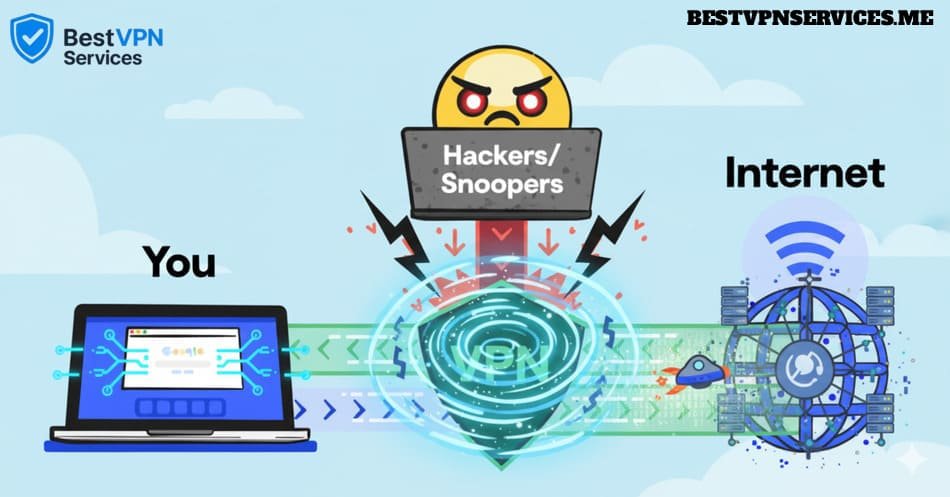
When you connect to a VPN:
- You open the VPN app on your device.
- You choose a server (for example, in the U.S., U.K., or Japan).
- Your connection is encrypted and routed through that server.
- Websites and apps now see the VPN server’s IP address instead of yours.
Without a VPN, your ISP (Internet Service Provider), advertisers, and even hackers on public Wi-Fi can see what you’re doing. With a VPN, your activity is hidden and your privacy protected.
Why Do People Use VPNs?
Over the past few years, VPNs have become essential tools for everyday internet users. Here are the main reasons people turn to VPNs:
- Privacy: Hide your IP address and prevent online tracking.
- Security: Encrypt your traffic on public Wi-Fi or unsecured networks.
- Streaming Freedom: Access Netflix, Hulu, Disney+, BBC iPlayer, and other streaming libraries worldwide.
- Censorship Bypass: Reach restricted websites and apps in countries with internet censorship.
- Safe Online Shopping & Banking: Protect financial data when making payments online.
- Remote Work: Companies use VPNs to secure connections for employees working from home.
VPNs in 2025: What’s Changed?
VPN technology has evolved a lot. In 2025, the best VPN providers offer:
- RAM-only servers: Ensuring no data is stored permanently.
- Faster protocols: WireGuard, NordLynx, and Lightway offer high-speed connections.
- Ad & tracker blocking: Many VPNs now block ads and malware by default.
- 10Gbps servers: High bandwidth for 4K/8K streaming and gaming.
- Cross-device support: Apps for smartphones, PCs, smart TVs, gaming consoles, and routers.
Benefits of Using a VPN
1. Protect Your Privacy
A VPN hides your browsing activity from ISPs, governments, and advertisers.
2. Secure Your Data
Even if you’re on public Wi-Fi (airports, cafes, hotels), your traffic is encrypted.
3. Stream Without Borders
Watch U.S. Netflix from Europe, access BBC iPlayer from the U.S., or enjoy anime on Netflix Japan.
4. Avoid Price Discrimination
Some websites show different prices depending on your location. A VPN lets you compare deals.
5. Safer Online Gaming
Protect yourself from DDoS attacks and access games not available in your region.
Are VPNs Legal?
In most countries, yes. Using a VPN is perfectly legal for privacy and security. However, some regions (like China, Russia, or the UAE) restrict or regulate VPN use.
Important note: Using a VPN to commit crimes remains illegal.
Types of VPNs
Not all VPNs are the same. Here are the main categories:
- Remote Access VPNs: Common for everyday users. Encrypt traffic between your device and the internet.
- Site-to-Site VPNs: Often used by businesses to connect multiple office networks.
- Personal VPN Services: Subscription-based apps for individuals (e.g., NordVPN, Surfshark).
For most users, a personal VPN service is the right choice.
Free VPNs vs Paid VPNs
This is a common question: should you use a free VPN?
Free VPNs:
- Limited speeds and data caps
- Often track and sell your data
- Few servers (usually overcrowded)
Paid VPNs:
- Fast speeds for streaming and gaming
- Strong no-logs policies
- 24/7 support
- Wide server coverage
💡 Conclusion: Free VPNs may be fine for light browsing, but for privacy, security, and streaming, paid VPNs are far superior.
How to Choose the Right VPN
Here are the factors you should consider when picking a VPN in 2025:
- Privacy Policy: Look for a no-logs policy with independent audits.
- Speed: Choose providers with WireGuard or their own fast protocol.
- Streaming Support: If you want Netflix, Hulu, or Disney+, check which VPNs unblock them.
- Device Compatibility: Works on Windows, Mac, iOS, Android, smart TVs, and routers.
- Server Locations: More countries = more access.
- Value for Money: Long-term plans usually save the most.
Best VPNs in 2025 for Beginners
After testing dozens of VPNs, here are some reliable providers:
- NordVPN: Best all-rounder for speed, privacy, and streaming.
- Surfshark: Best value with unlimited devices.
- ExpressVPN: Best for streaming reliability.
- Bitdefender VPN: Good add-on if you already use Bitdefender antivirus.
- SafeShellVPN: An emerging option for budget users.
- PureVPN: Wide server coverage at an affordable price.
👉 For a full breakdown, check out our guide on Best VPNs for 2025.
Common Myths About VPNs
❌ Myth 1: VPNs make you completely anonymous
➡️ VPNs improve privacy but don’t guarantee 100% anonymity.
❌ Myth 2: VPNs are only for hackers
➡️ Millions of normal users rely on VPNs for streaming, shopping, and everyday browsing.
❌ Myth 3: VPNs always slow down your internet
➡️ With modern protocols like WireGuard, most users barely notice a difference.
How to Use a VPN (Step by Step)
- Choose a provider (e.g., NordVPN or Surfshark).
- Download the app on your device.
- Log in with your account.
- Select a server location (U.S., U.K., Japan, etc.).
- Connect and browse – your traffic is now encrypted.
It’s that simple.
FAQ – VPNs Explained
1. What does VPN stand for?
VPN = Virtual Private Network.
2. Do I really need a VPN?
If you care about privacy, security, or accessing global streaming, yes.
3. Can I use a VPN on my phone?
Absolutely. VPN apps exist for Android and iOS.
4. Will a VPN hide me from my ISP?
Yes, your ISP can only see that you’re connected to a VPN, not what you’re doing.
5. What’s the best VPN for streaming Netflix in 2025?
NordVPN and ExpressVPN remain the most reliable.
Final Thoughts – Do You Need a VPN in 2025?
The internet in 2025 is faster and more connected than ever, but also more tracked and restricted. Whether you want privacy, security, or just access to global Netflix libraries, a VPN is one of the simplest tools you can use.
Our top recommendation for most people is NordVPN — fast, secure, and reliable. For unlimited devices, Surfshark is a fantastic value. And if you want premium reliability, ExpressVPN is the way to go.
👉 Ready to protect your privacy and unlock the internet? Try one of the best VPNs for 2025 today.



Leave a Comment